

TL;DR: How to Use SCL’s Free CS2 Server
- Log in at SCL.GG.
- Go to Scrims tab and click Start Server.
- Pick your game mode and server settings (location, map, etc.).
- Start the server and grab the Server IP.
- Open CS2, paste the IP in the console (
§key), and connect.
Hi, Counter-Strike community!
Here at SCL, we are offering free-to-use CS2 servers. The concept is quite simple, as a player, you can log in to the SCL platform and start a CS2 server whenever you need. We have multiple game modes available. Here are some examples:
- Scrim (Match-Mode)
- Practice (Grenade practice, bot management, replays, spawn practice, dry-run, wingman, and more)
The servers are available on demand, meaning that when you start a server, you will be given a server IP that you can connect to immediately. When selecting Scrim mode, the server is available for a full match, and if selecting Practice mode, it is available for 45 minutes (unless you choose to extend it using the .extend command, which is free to use).
The cool thing about the SCL server is that we store your settings for future use. This means that if you store grenade lineups, bot replays, and more, the server will keep that for your next session. We also store your demos for 2 months (if demo recording is enabled). Because of this, you can treat this as if it were your own 24/7 server, available on demand whenever you need it, with your specific data and preferred settings.
How to Use a Free CS2 server
- First, log in or register at SCL.GG.
- Head over to the Scrims tab which you can find in the top menu.
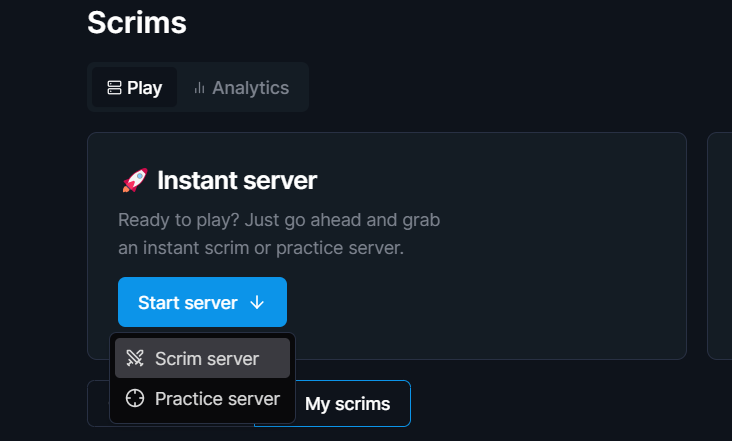
- Click the button Start Server and select your preferred game mode.
-
- Select your preferred server settings, such as location, map, playout, and demo recording.
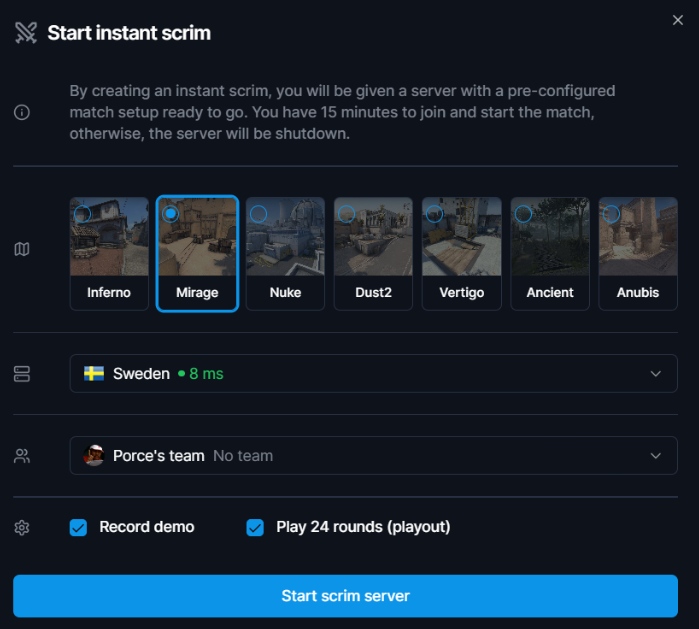
- Finally, start the server and you will be redirected to a new page.
- On the server page, you can find information such as commands, match details, and most importantly, the server IP.
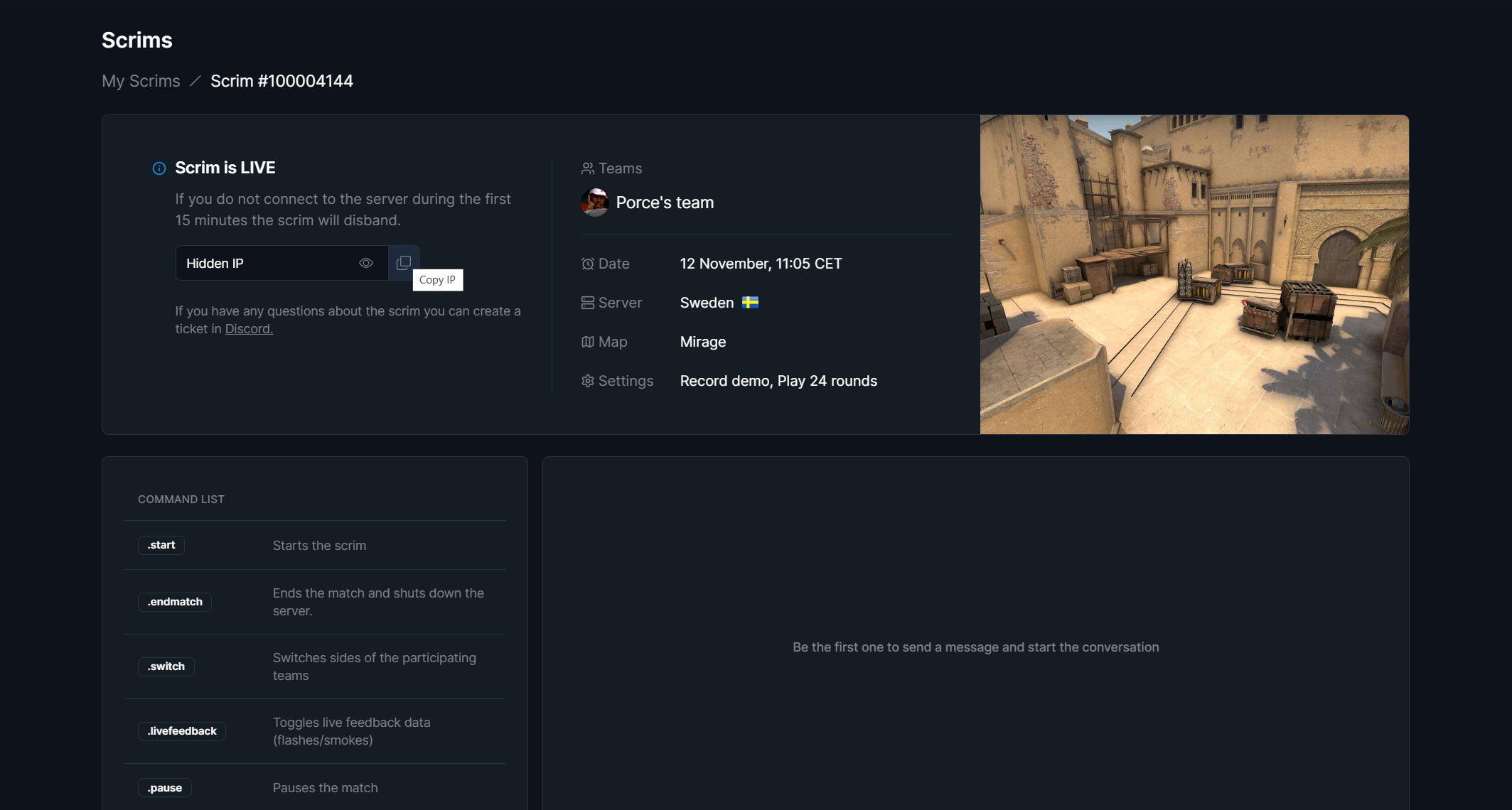
- Copy the Server-IP and start CS2.
- Enter the IP in the console (Open the console by clicking the § key under ESC on your keyboard).
- Viola! You are now fully connected. Have fun!
Q: What is the SCL free-to-use CS2 server?
A: The SCL platform provides Counter-Strike 2 (CS2) servers that players can use for free. You can log in, select a server type, and start playing without any setup hassle.
Q: What game modes are available on the SCL servers?
A: SCL offers various modes including:
- Scrim (Match-Mode) for competitive matches
- Practice modes for grenade practice, bot management, replays, spawn practice, dry-run, wingman, and more.
Q: How do the on-demand servers work?
A: When you start a server, you get a unique IP to connect immediately. Scrim mode servers run for the entire match duration, while Practice mode servers are available for 45 minutes (with the option to extend the time using the .extend command, free of charge).
Q: Do my settings and data save for future sessions?
A: Yes! SCL servers remember your settings like grenade lineups, bot replays, and other data. Your preferences are stored, so each session is tailored to you. Additionally, any enabled demo recordings are kept for two months.
Q: Can I keep my demos for a long period?
A: SCL retains demo recordings for two months if recording is enabled, so you have plenty of time to review your gameplay.
Q: Can I extend the server time in Practice mode?
A: Yes, you can use the .extend command, which is free, to lengthen your Practice session as needed.
This FAQ should cover the primary questions and provide a quick guide for new users. Let me know if there’s anything else you’d like to add!